
CTD — Count Down
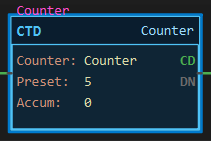
Description
Section titled “Description”CTD (Count Down) subtracts one from its accumulator each time its rung goes from false to true. Like CTU it counts the transition, not the scan. The DN bit follows the same rule as for CTU: it is on while the accumulator is greater than or equal to the preset, so counting down through the preset turns DN off. Use CTD with a CTU on the same counter to track a quantity that rises and falls, such as items in a buffer or cars in a lot, or on its own to count down a loaded value. Do not put an ONS in front of a CTD; it detects the edge itself.
Operands
Section titled “Operands”| Operand | Type | Format | Valid Range | Required | Description |
|---|---|---|---|---|---|
| Counter | COUNTER | Tag name or Array[n] |
A COUNTER tag; a CTU and a CTD may share one | Yes | The structure that holds this counter’s preset, accumulator and status bits. |
| Preset | DINT | Whole number | −2,147,483,648 to 2,147,483,647 | Yes | The count at or above which DN is on. Stored in the tag as .PRE; editable online. |
| Accum | DINT | Whole number | Read-only on the face | — | The current count, .ACC. Retained until RES. |
Scan Behavior
Section titled “Scan Behavior”Prescan
Section titled “Prescan”CD is cleared. ACC, DN, OV and UN keep their values.
Rung-condition-in is false
Section titled “Rung-condition-in is false”CD clears. Nothing else changes; the count is held.
Rung-condition-in is true
Section titled “Rung-condition-in is true”If the rung was false on the previous scan, this is a rising edge: ACC decreases by one. CD sets. DN is then set if ACC is greater than or equal to PRE, otherwise cleared. If ACC was already at the DINT minimum it wraps to the DINT maximum and UN sets. If the rung was already true last scan, nothing happens.
Postscan
Section titled “Postscan”Nothing special.
Member Bits
Section titled “Member Bits”| Member | Type | Set when | Cleared when |
|---|---|---|---|
.CD |
BOOL | The rung is true | The rung is false |
.CU |
BOOL | A CTU on the same counter has a true rung | That CTU’s rung is false |
.DN |
BOOL | ACC is greater than or equal to PRE | ACC drops below PRE, or RES |
.UN |
BOOL | ACC wraps from −2,147,483,648 to +2,147,483,647 | RES only |
.OV |
BOOL | A CTU on the same counter wraps the other way | RES only |
.PRE |
DINT | The preset | — |
.ACC |
DINT | The count; may go negative | RES only |
Example
Section titled “Example”Scenario: A machine builds parts in batches of five, counted up by a CTU on each completed cycle (the CTU page). A part that fails inspection is pulled from the batch, so it has to come back off the count. Inspect_Fail is true for as long as the rejected part sits in the station and drops when it has been removed; an XIO in front of the CTD turns that drop into the rising edge that counts one down.
Tags:
Cycle_Complete— Cycle complete, BOOLInspect_Fail— Inspection failed, BOOL (true while a rejected part is in the station)Counter— COUNTER, Preset 5BatchDone— Batch complete lamp, BOOL
Rung 1 (parts made):
—|XIC Cycle_Complete|———[CTU Counter Preset 5]———Rung 2 (parts rejected):
—|XIO Inspect_Fail|———[CTD Counter Preset 5]———Rung 3 (the lamp):
—|XIC Counter.DN|———(OTE BatchDone)———Complete one cycle: the Accum reads 1. Now a part fails: Inspect_Fail goes true, the XIO opens and the CTD’s rung goes false. Nothing counts yet. Remove the reject: Inspect_Fail drops, the XIO closes, the rung goes true, and that rising edge takes the Accum back to 0. CD lights while the rung stays true; DN is dark because 0 is below the preset. That is the state in the screenshot.

Run on to five good parts: DN lights and BatchDone turns on. A reject now takes the Accum to 4 and DN goes dark again until the next good cycle. Both instructions show the same Accum because they share the one counter; CU belongs to the CTU’s rung and CD to this one.
See Also
Section titled “See Also”- CTU — Count Up (the same counter, counting the other way)
- RES — Reset (clears the shared accumulator)
- MOV — Move (load a starting count into
.ACCfor a countdown) - Timer and Counter Instructions — Category index
DN means “at or above preset”, counting either way. This is the RSLogix rule. A CTD alone, started from zero, has DN off and counts into negative numbers; it does not set DN at zero. To count down from a loaded value, move the value into .ACC with MOV and read .DN going off as “reached the preset”.
Negative presets. The compare is signed and nothing changes below zero: DN is on whenever ACC is greater than or equal to PRE. A CTD with a negative preset therefore has DN on from the moment it is reset, because 0 is above the preset, and DN goes off only when the count has fallen below it. With Preset −25 and Accum −1 the DN indicator is lit; it goes dark on the 26th count, when the Accum reaches −26. This is not a fault and it is how the SLC 500 behaves: its manual notes that when “the counter preset value is negative, the RES instruction sets the accumulated value to zero. This in turn causes the done bit to be set by a count down or count up instruction.” If you want a bit that comes on when the countdown arrives at a negative target, read XIO Counter.DN.
Underflow does not fault. At the DINT minimum the accumulator wraps to the maximum and UN sets; counting continues. UN stays set until RES.
Up and down on one counter. A CTU and a CTD may name the same COUNTER tag. They share ACC, PRE and DN; CU belongs to the CTU and CD to the CTD.
RES clears everything but the edge memory. ACC, DN, OV and UN go to 0. A rung still held across the reset does not count again until it has gone false and true once more.
Counter arrays. The Counter operand may be an element of a COUNTER array.
Applies to LadderIDE >=1.2.2 · Last reviewed 2026-09-10 · Screenshots verified 2026-09-10