
EQU — Equal
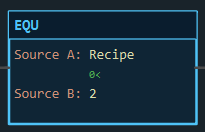
Description
Section titled “Description”EQU (Equal) is true when Source A equals Source B. It is a condition, like a contact: it passes rung continuity when the test holds and blocks it when it does not, and it writes nothing. Use EQU to select on a value: a recipe number, a step in a hand-rolled sequence, a mode word, a matching part code. Do not use EQU on a REAL that is the result of arithmetic; two floating-point values that “should” be equal rarely are, so test with LIM or a pair of LES/GRT instead.
Operands
Section titled “Operands”| Operand | Type | Format | Valid Range | Required | Description |
|---|---|---|---|---|---|
| Source A | Any numeric tag, member, element or bit; a STRING tag; or a literal | Tag, Tag.Member, Tag[n], Tag.bit, or a literal |
Any resolvable reference | Yes | The first value. |
| Source B | Same as Source A | Same | Any resolvable reference; defaults to 0 | Yes | The value to compare against. |
Literals may be whole numbers (25, -3, 0x1F), decimals (72.5), or quoted strings ("RUN"). Either operand may be a literal; LadderIDE does not require Source A to be a tag. A BOOL reads as 0 or 1. An INT compared with a REAL is compared as a number; nothing is truncated.
Strings. EQU and NEQ are the two compare instructions that accept STRING operands, and they compare the contents, case-sensitively. Comparing a STRING with a number is never true.
Scan Behavior
Section titled “Scan Behavior”Prescan
Section titled “Prescan”EQU has no state. It evaluates from the current values on the first scan.
Rung-condition-in is false
Section titled “Rung-condition-in is false”The instruction does not pass continuity, whatever the values. On the canvas the block still colours by its own result, so you can see the comparison even when nothing upstream is true.
Rung-condition-in is true
Section titled “Rung-condition-in is true”Both operands are read and compared. If they are equal the instruction conducts and the rung continues; otherwise the rung is false from this point.
Postscan
Section titled “Postscan”Nothing.
Example
Section titled “Example”Scenario: An operator selects a recipe by number. Recipe 2 is the mixing recipe, and it enables the mixer.
Tags:
Recipe— Selected recipe number, INTMix_Sel— Mixer selected, BOOL
Rung 1:
—[EQU Recipe 2]———(OTE Mix_Sel)———Scan 1 — Recipe = 0. No recipe has been selected yet. 0 is not 2: the block is dark, the rung is false, Mix_Sel = 0. The small 0< under Recipe is the live value of that operand; the literal 2 has no value line because it cannot change.

Scan 2 — Recipe = 2. The operator picks recipe 2. The values match: the block lights, the rung is true, Mix_Sel = 1.

Type 3 into Recipe and the mixer drops out again on the next scan. The comparison is made every scan; there is no memory.
See Also
Section titled “See Also”- NEQ — Not Equal (the inverse test)
- LIM — Limit Test (equal within a tolerance)
- CMP — Compare by expression (several tests in one instruction)
- XIC — Examine If Closed (the same idea for a single bit)
- Compare Instructions — Category index
Compare, don’t examine. To test a single BOOL use XIC or XIO, not EQU Flag 1. Both work, but the contact is what every other ladder programmer expects to see.
REAL equality. A value produced by ADD, DIV, SCP or CPT can differ from the value you typed by a rounding error, so EQU Result 2.5 may never be true. Use LIM 2.49 Result 2.51.
Bits as operands. An INT or DINT bit such as Status.3 is a valid operand and reads as 0 or 1.
Members as operands. Timer and counter members work directly: EQU Batch.ACC 10 is true on the scan the count reaches ten.
Applies to LadderIDE >=1.2.2 · Last reviewed 2026-09-11 · Screenshots verified 2026-09-11