
LIM — Limit Test
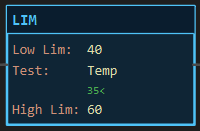
Description
Section titled “Description”LIM (Limit Test) is true when the Test value lies within the band from Low Limit to High Limit, both limits included. It is a condition that writes nothing. Use LIM for any “in range” test: a temperature within its operating band, a pressure between two trips, a part dimension within tolerance, a REAL that should equal a target give or take a little. Set the Low Limit above the High Limit and the test inverts: LIM is then true when the Test value is outside the band, which is the RSLogix 500 behaviour and the way to write an out-of-range alarm in one instruction.
Operands
Section titled “Operands”| Operand | Type | Format | Valid Range | Required | Description |
|---|---|---|---|---|---|
| Low Lim | Any numeric tag, member, element or bit, or a literal | Tag, Tag.Member, Tag[n], Tag.bit, or a literal |
Any resolvable numeric reference; defaults to 0 | Yes | The lower edge of the band, inclusive. |
| Test | Same | Same | Any resolvable numeric reference | Yes | The value under test. |
| High Lim | Same | Same | Any resolvable numeric reference; defaults to 100 | Yes | The upper edge of the band, inclusive. |
Any of the three may be a literal or a tag. LadderIDE does not impose the SLC 500 rule that a constant Test needs tag limits. Mixed INT and REAL operands compare as numbers.
Scan Behavior
Section titled “Scan Behavior”Prescan
Section titled “Prescan”No state. Evaluates from the current values on the first scan.
Rung-condition-in is false
Section titled “Rung-condition-in is false”The instruction does not pass continuity. The block still colours by its own result on the canvas.
Rung-condition-in is true
Section titled “Rung-condition-in is true”All three operands are read and the result depends on the order of the limits:
| Limits | True when | False when |
|---|---|---|
| Low Lim ≤ High Lim | Low ≤ Test ≤ High | Test below Low or above High |
| Low Lim > High Lim | Test ≥ Low or Test ≤ High | Test strictly between High and Low |
With Low 5 and High 8, the instruction is true for 5, 6, 7 and 8. With Low 8 and High 5, it is true for everything except 6 and 7. The limits are always included in the true set, whichever way round they are.
Postscan
Section titled “Postscan”Nothing.
Example
Section titled “Example”Scenario: A process temperature must sit between 40 and 60 degrees for the “in band” permissive that lets the next stage start.
Tags:
Temp— Process temperature, REALIn_Band— Temperature in band, BOOL
Rung 1:
—[LIM 40 Temp 60]———(OTE In_Band)———Scan 1 — Temp = 35. Below the low limit: the block is dark, In_Band = 0.

Scan 2 — Temp = 50. Inside the band: the block lights, In_Band = 1. It would also be lit at exactly 40 or exactly 60.

The same instruction as an alarm. Swap the limits, LIM 60 Temp 40 → OTE Out_Of_Band, and the coil is on for 35, off for 50, and on again for 65. One instruction, no NOT logic.
See Also
Section titled “See Also”- LES / GRT — the two edges as separate tests
- EQU — Equal (LIM with a narrow band is the safe equality test for REALs)
- CMP — Compare by expression (
Temp >= 40 AND Temp <= 60is the same test) - SCP — Scale with Parameters (often feeds a LIM)
- Compare Instructions — Category index
Reversed limits are a feature, not a mistake. Low above High means “outside”. If you meant “inside”, swap them; the block face shows the order, so a reversed pair is easy to spot.
Equal limits. Low 50 and High 50 is true only when Test is exactly 50.
REAL tolerance. LIM 2.49 Result 2.51 is the practical way to ask whether a computed REAL is 2.5.
Tags as limits. The limits may be tags, so a band can be set from the Tag Browser or by MOV at run time: LIM Lo_Trip Pressure Hi_Trip.
Applies to LadderIDE >=1.2.2 · Last reviewed 2026-09-11 · Screenshots verified 2026-09-11