
MAM — Motion Axis Move
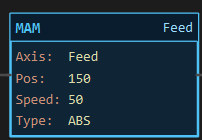
Description
Section titled “Description”MAM (Motion Axis Move) moves an axis to a position. On the false-to-true transition of its rung it takes the Position, Speed and Accel operands and starts a trapezoidal move; the axis service then runs the move to completion over the following scans whether or not the rung stays true. EN and IP are 1 while the move runs; DN and PC set when the target is reached. An absolute move goes to Position; an incremental move goes Position units from where the axis is. Use MAM for every point-to-point positioning task. Do not use MAM on a DC axis, which has no position, and do not hold its rung expecting the move to repeat; MAM acts once per rising edge.
Operands
Section titled “Operands”| Operand | Type | Format | Valid Range | Required | Description |
|---|---|---|---|---|---|
| Axis | Axis | Axis name | Any stepper or servo axis with a driver | Yes | The axis to move. |
| Position | REAL | Literal or tag | Any value in axis units; servo axis: 0 to 180 degrees | Yes | Target (absolute) or distance (incremental). A tag is read on the edge. |
| Move Type | Choice | absolute or incremental |
— | Yes | Absolute: go to Position. Incremental: go Position units from the current position, sign giving direction. |
| Speed | REAL | Literal or tag | > 0, axis units per second | Yes | Maximum speed of the move. |
| Accel | REAL | Literal or tag | > 0, axis units per second squared | Yes | Acceleration and deceleration of the move. |
Scan Behavior
Section titled “Scan Behavior”Prescan
Section titled “Prescan”Nothing. The edge memory starts false, so a rung already true on the first scan starts a move on that scan.
Rung-condition-in is false
Section titled “Rung-condition-in is false”Nothing new is commanded. A move already started continues to its target. The edge memory is armed for the next true scan.
Rung-condition-in is true
Section titled “Rung-condition-in is true”On the first true scan after a false one (the rising edge): the operands are read, the axis speed and acceleration are set, the target is loaded, CmdPos = target, EN = 1, DN = PC = 0. On following true scans nothing more is commanded; the axis service keeps stepping toward the target and sets IP and InMotion while it does. When the target is reached, DN = PC = 1 and EN = IP = 0.
A new rising edge while a move is running retargets the axis at once, with the new speed and acceleration.
Postscan
Section titled “Postscan”Nothing.
| Scan | EN | IP | DN | PC | ActualPos |
|---|---|---|---|---|---|
| Before the edge | 0 | 0 | last | last | at rest |
| Edge scan | 1 | 1 | 0 | 0 | starts toward target |
| Moving | 1 | 1 | 0 | 0 | approaching target |
| Target reached | 0 | 0 | 1 | 1 | = target |
Servo axis. The angle is written immediately on the edge and DN/PC set on the same scan; Speed and Accel are ignored because a hobby servo ramps on its own.
Axis Members
Section titled “Axis Members”Motion status lives on the axis, not on a per-instruction tag. Every member is a reference you can use anywhere (XIC Feed.DN, GRT Feed.ActualPos 100).
| Member | Data type | Set by | Cleared by | Description |
|---|---|---|---|---|
EN |
BOOL | MAM edge, MAJ, MAG | Target reached, MAS, MSF | A motion command is engaged. |
IP |
BOOL | Axis service while steps are being produced | Motion stops | Motion in process. |
DN |
BOOL | Target reached, MSR | MAM edge, MAJ start | Instruction done. |
PC |
BOOL | Same as DN |
Same as DN |
Process complete. Same timing as DN in this release. |
CmdPos |
REAL | MAM edge (the target, absolute), MAG, MSR | — | Commanded target in axis units. |
ActualPos |
REAL | Axis service every scan | — | Position in axis units. |
Counts |
DINT | Axis service every scan | MSR, ResetCounts |
Raw step counts. |
InMotion |
BOOL | Axis service | Axis service | Steps produced this scan. |
Dir |
BOOL | Axis service | Axis service | 1 = forward. |
DriverOn |
BOOL | MSO | MSF | The drive is enabled. |
Error |
BOOL | Watchdog mismatch, TMC2130 driver fault | MAFR | Axis fault. |
RedefinePos |
REAL | MSR | — | Value of the last MSR. |
ResetCounts |
BOOL | Your logic (write 1) | Firmware, after zeroing | Zero the counts without an MSR. |
Watchdog |
INT (ms) | Axis properties; your logic may overwrite | — | Mismatch tolerance before Error sets. |
Example
Section titled “Example”Scenario: A move pushbutton sends the Feed carriage to 150 mm at 50 mm/s, accelerating at 200 mm/s². The drive was enabled on the MSO page.
Tags:
Move_Cmd— Move command, BOOLFeed— stepper axis, step/dir on D8/D9, linear, 80 counts per mm
Rung 1:
—|XIC Move_Cmd|———[MAM Feed Pos 150 ABS Speed 50 Accel 200]———Scan 1 — Move_Cmd = 0. At rest at 0 mm: Feed.ActualPos = 0, Feed.EN = 0, Feed.DN = 0.

Scan 2 — Move_Cmd = 1 (rising edge). The move starts: Feed.CmdPos = 150, Feed.EN = 1, Feed.IP = 1. The block paints neutral; the wire shows the rung is true.

About three seconds later. Feed.ActualPos = 150, Feed.DN = 1, Feed.PC = 1, Feed.EN = 0, Feed.IP = 0. Watch it in the Tag Browser: expand Feed while the simulator runs and ActualPos climbs to 150.
Values before and after: Feed.ActualPos 0 → 150; Feed.DN 0 → 1. Holding Move_Cmd does nothing further. Release it and press again to repeat the move (which, being absolute, goes nowhere the second time).
See Also
Section titled “See Also”- MAS — Motion Axis Stop (abort a move)
- MAJ — Motion Axis Jog
- MSR — Motion Set/Redefine Position (home before absolute moves)
- MAG — Motion Axis Gear
- MSO — Motion Servo On (enable the drive first)
- Adding an Axis — units, counts per unit and driver pins
- Motion Instructions — Category index
Home first. Absolute positions are measured from wherever the counter was zero. Use an MSR at a home sensor, or ResetCounts, before the first absolute move after power-up.
Interlock with the drive. A move commanded while DriverOn is 0 is counted but not performed: ActualPos reaches the target while the motor never turned. Condition every MAM on XIC <axis>.DriverOn.
Units. Position is in the axis unit named in the axis properties (mm, deg, rev); Speed in units per second; Accel in units per second squared. The conversion to steps uses the axis’s Counts per unit.
Speeds a small controller can produce. An Uno steps at a few thousand pulses per second at most. Speed × counts per unit is the step rate you are asking for; a rate the controller cannot keep up with is simply slower, not faulted.
Incremental sign. A negative Position in an incremental move goes backwards. CmdPos shows the resulting absolute target.
Servo axis. Position is the servo angle in degrees, clamped by the servo library to its travel.
Applies to LadderIDE >=1.2.2 · Last reviewed 2026-09-11 · Screenshots verified 2026-09-11