
MOV — Move
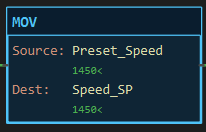
Description
Section titled “Description”MOV (Move) copies the value of Source to Dest every scan its rung is true. Source is left unchanged. It is an output instruction with no state and no status bits, and the most common way to load a setpoint, select a recipe value, latch a reading for display, or preset a timer or counter through its .PRE member. Do not use MOV to convert between text and numbers; it copies like for like, and the convert instructions TOS, TOI, TOD and TOR do the translation.
Operands
Section titled “Operands”| Operand | Type | Format | Valid Range | Required | Description |
|---|---|---|---|---|---|
| Source | Any tag, member, element or bit, or a literal | Tag, Tag.Member, Tag[n], Tag.bit, a number, or a quoted string |
Any resolvable reference | Yes | The value to copy. |
| Dest | A writable tag, member or element | Tag, Tag.Member, Tag[n], Tag.bit |
Not a literal, not an input pin | Yes | Where the copy is written. |
Numbers. Any numeric Source may go to any numeric Dest. A REAL into a whole-number Dest truncates toward zero and wraps past the Dest’s range; an INT into a REAL is exact. A number into a BOOL Dest writes 1 for anything non-zero.
Text. A STRING tag or a quoted literal ("RUN") may go to a STRING Dest, and only there. Text is cut at 15 characters. A text Source with a numeric Dest, or a numeric Source with a STRING Dest, is a validation error.
Members. MOV 5000 Batch.PRE presets a timer from logic; MOV Batch.ACC Elapsed copies its accumulator out.
Scan Behavior
Section titled “Scan Behavior”Prescan
Section titled “Prescan”Nothing. Dest keeps its power-up value.
Rung-condition-in is false
Section titled “Rung-condition-in is false”The instruction does nothing. Dest holds its last value.
Rung-condition-in is true
Section titled “Rung-condition-in is true”Source is read and written to Dest every scan the rung is true. Anything else writing Dest later in the same scan wins.
Postscan
Section titled “Postscan”Nothing.
Example
Section titled “Example”Scenario: A drive’s speed setpoint is loaded from a recipe value when the operator confirms the recipe.
Tags:
Load_Recipe— Confirm recipe, BOOLPreset_Speed— Recipe speed in rpm, INTSpeed_SP— Drive setpoint in rpm, INT
Rung 1:
—] [Load_Recipe———[MOV Preset_Speed Speed_SP]———Scan 1 — Load_Recipe = 0. Preset_Speed reads 1450. The rung is false: Speed_SP holds 0.

Scan 2 — Load_Recipe = 1. Speed_SP reads 1450.

Speed_SP keeps 1450 after the button is released. Change Preset_Speed while the button is held and the setpoint follows it every scan.
See Also
Section titled “See Also”- CLR — Clear (a MOV of zero)
- COP — Copy File (a whole array at once)
- Convert — TOI, TOD, TOR, TOS (text to number and back)
- OTE — Output Energize (the rung condition into a bit; MOV is not the way)
- Move/Logical Instructions — Category index
Literal into a tag. MOV 0 Step is a common step-sequence reset. MOV "IDLE" Mode_Txt loads a display string.
One-shot loads. A MOV behind a pushbutton runs for every scan the button is held, which is harmless for a constant but not for a value that another rung changes. Gate it with an ONS when the load must happen once.
Bit to bit. MOV Sensor Copy_Bit is legal but reads oddly. Use XIC Sensor → OTE Copy_Bit.
The block never colours. Watch the rung wire and the Dest value line.
Applies to LadderIDE >=1.2.2 · Last reviewed 2026-09-11 · Screenshots verified 2026-09-11